
Polkadot Statement Store: How Decentralized Messaging Works
Learn how Polkadot's Statement Store, also known as Celerity, handles signed off-chain messages, including topics, channels, expiry, and allowances.
At Web3 Summit, Parity presented several concepts through Trinity, exploring how decentralized messaging, payments, identity, and other capabilities could work together through a common interface. One of the protocols demonstrated as part of this broader direction was Celerity, also known as the Statement Store.
In short, the Polkadot Statement Store is a network-layer publish/subscribe protocol for signed off-chain messages. Statement payloads are not written into blockchain storage, after validation, they are distributed peer-to-peer through a gossip network on a best-effort basis.
For developers who need users to communicate without storing data on a blockchain or a central server, the Statement Store is worth a look. This article goes inside it: what it is, what a statement is, and how the store keeps and removes them.
How does the Polkadot Statement Store work?
The Statement Store is a protocol for decentralized messaging: each node keeps its own view of the current state. Data lives off-chain, so it doesn't bloat chain storage and doesn't wait for blocks to spread. A message - a statement - is cryptographically signed. A user submits it to a node; the node checks the signature, stores it locally, and propagates it to its peers. From there, it spreads node to node, and after a while another node on the network can serve it.
The store doesn't try to match a centralized service. It is designed for decentralized, short-lived signaling rather than centralized-service delivery guarantees, and in return it deliberately relaxes other guarantees, like delivery and latency. This is a best-effort protocol. A freshly submitted statement is not guaranteed to reach every node at once, and two nodes can hold different views. Delivery is best-effort: a statement accepted by one node may propagate to other nodes, but delivery is not guaranteed.
 Signed statements propagate between participating nodes on a best-effort basis.
The protocol is deliberately straightforward. It works as a generic messaging protocol - a transport layer. It does not encrypt statement payloads or provide reliable delivery, acknowledgments, or ordering. Applications can add encryption and higher-level reliability where needed. A developer builds those on top, with key exchange or encryption, as over any other transport. This deliberate choice to keep the core minimal makes the protocol easier to understand and lets each app set its own guarantees.
The Statement Store is a natural fit for communication apps that usually rely on centralized servers. A chat is the simplest example: two users negotiate a key exchange and start an encrypted conversation, with no server between them.
Audio and video calls work too. WebRTC needs a signaling channel to establish a connection, and many applications use a centralized signaling server for that step. The Statement Store can carry the SDP offer and answer instead, removing the need for a centralized signaling server. These are only two examples. Any protocol that needs signed, addressable messages without a server in the middle can sit on top of the store.
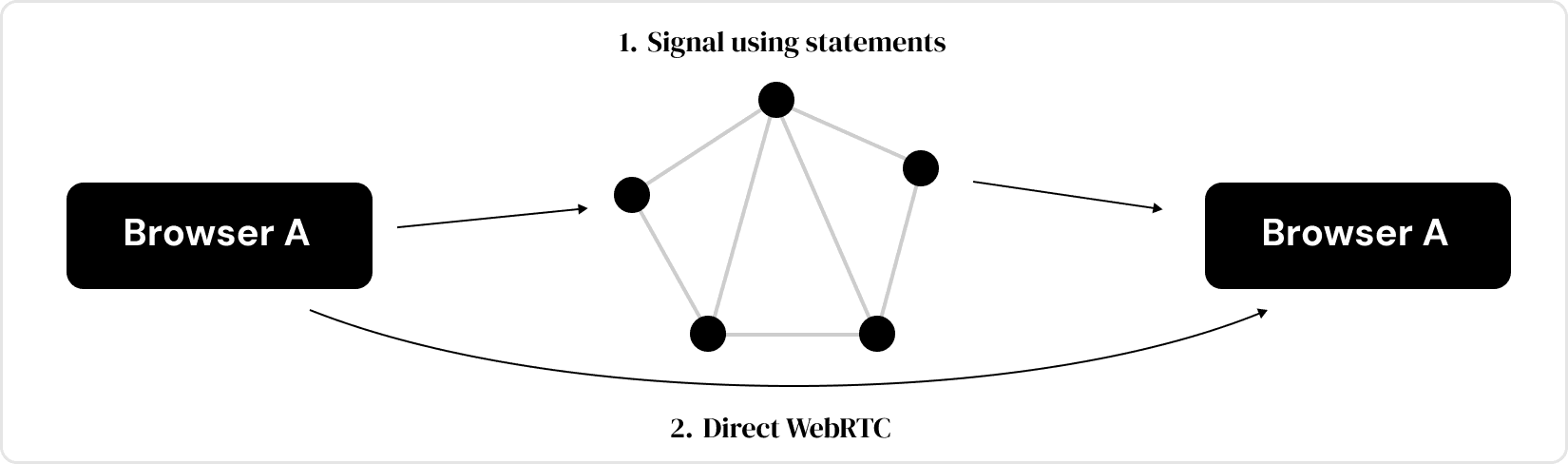 The Statement Store can handle WebRTC signaling before a direct connection.
What is a Statement Store statement?
As mentioned, a statement is the message we send to a node. To keep propagation efficient, the recommended per-statement user data size is approximately 512 bytes, which should be enough for a wide variety of use cases. Besides the data, it carries several fields. We'll explain the three most important: topics, expiry, and a channel.
Topics are the main mechanism applications use to filter and subscribe to relevant statements. Think about a blog with many posts: tags narrow them down to the relevant ones. Topics are tags for statements. Each statement carries up to four. A statement can have no topics, but then no one can find it. Which topics to use is up to the developer: one might be a unique app ID, another a particular flow inside the app, or all of them folded into a single topic. By subscribing to topics, users can read statements: they tell a node which topics interest them and receive only matching ones.
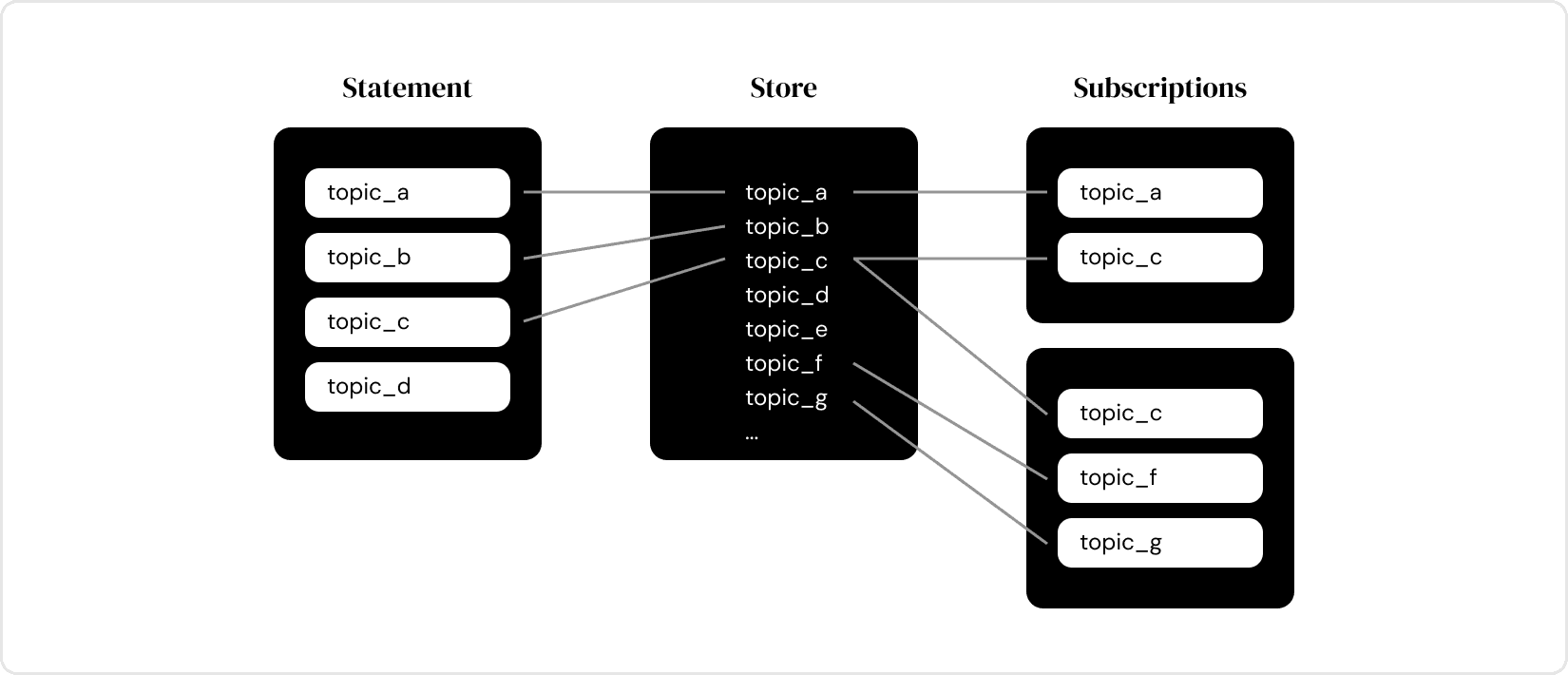 Topics determine which statements subscribers receive.
Expiry looks like a plain date: once it passes, the statement no longer matters, and a node may drop it. But it isn't a plain timestamp. It's a 64-bit number made of two 32-bit halves: the high half is the timestamp, the low half is a priority. Because the timestamp sits in the high bits, it dominates, and the priority only breaks ties between equal timestamps.
A statement can therefore be configured to expire, while two statements with the same timestamp can still rank against each other, and the priority still orders one statement above another. That priority is what lets one statement overwrite another, as the next field shows.
 Priority ranks statements with the same expiry timestamp.
A channel is an optional field we wouldn't need if we had unlimited storage. It lets a user replace a statement before its expiry. A channel works like a chair that seats one person until someone more important takes the seat.
In the store, one user can't hold two statements with the same channel. Other users' channels don't matter. When a second statement arrives on the same channel, the store keeps one and evicts the other by expiry. For example, to overwrite a wrong statement, a user submits another with the same channel and timestamp but a higher priority in the two-part expiry.
Don't confuse topics and channels. A node can't be asked for statements by channel --- that works only with topics.
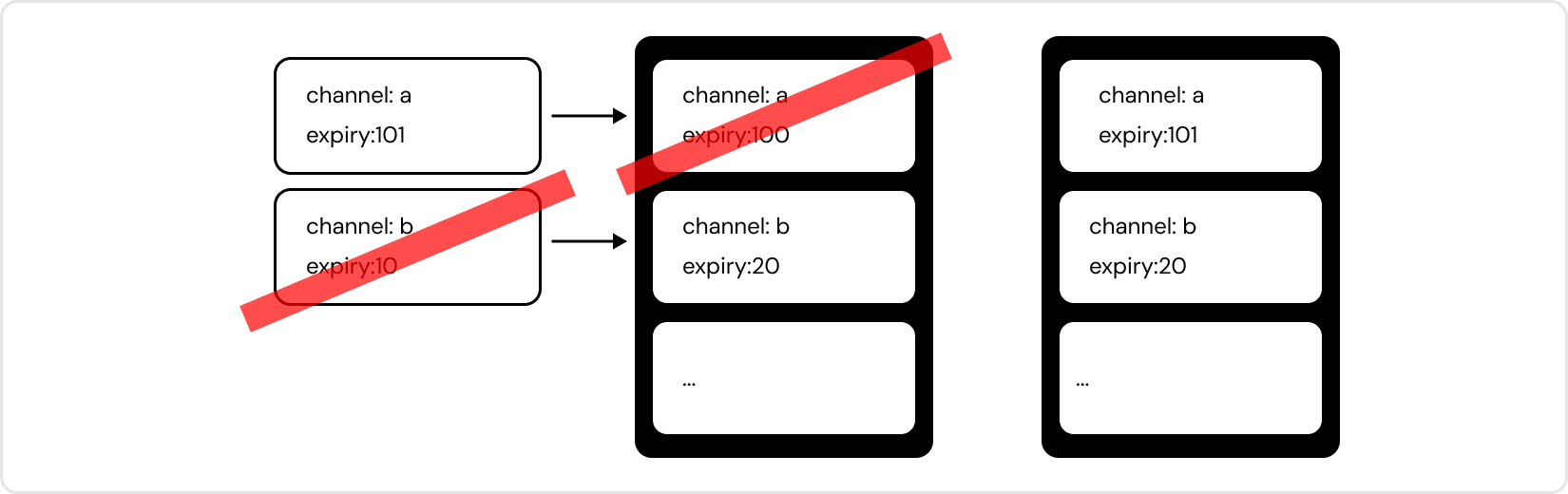 A channel lets one statement replace another.
How does Statement Store allowance work?
An allowance sets how much Statement Store capacity an account can use at once, including both the number of live statements and their total size, and the logic that decides it lives in the runtime. This is a limit at any given moment, not a lifetime total. A user can keep submitting over time, but never holds more than their allowance at once.
The Statement Store is deliberately simple. Basically, a user either submits statements or queries them. There is no manual way to delete a statement, but that doesn't mean statements never leave the store. One way to leave is expiry: once a statement's expiry passes, a node drops it from disk. The other is overwrite, which we already explained through channels. But even without channels, the allowance holds. If a user submits past their allowance, the new statement may be rejected or may overwrite an existing lower-priority statement.
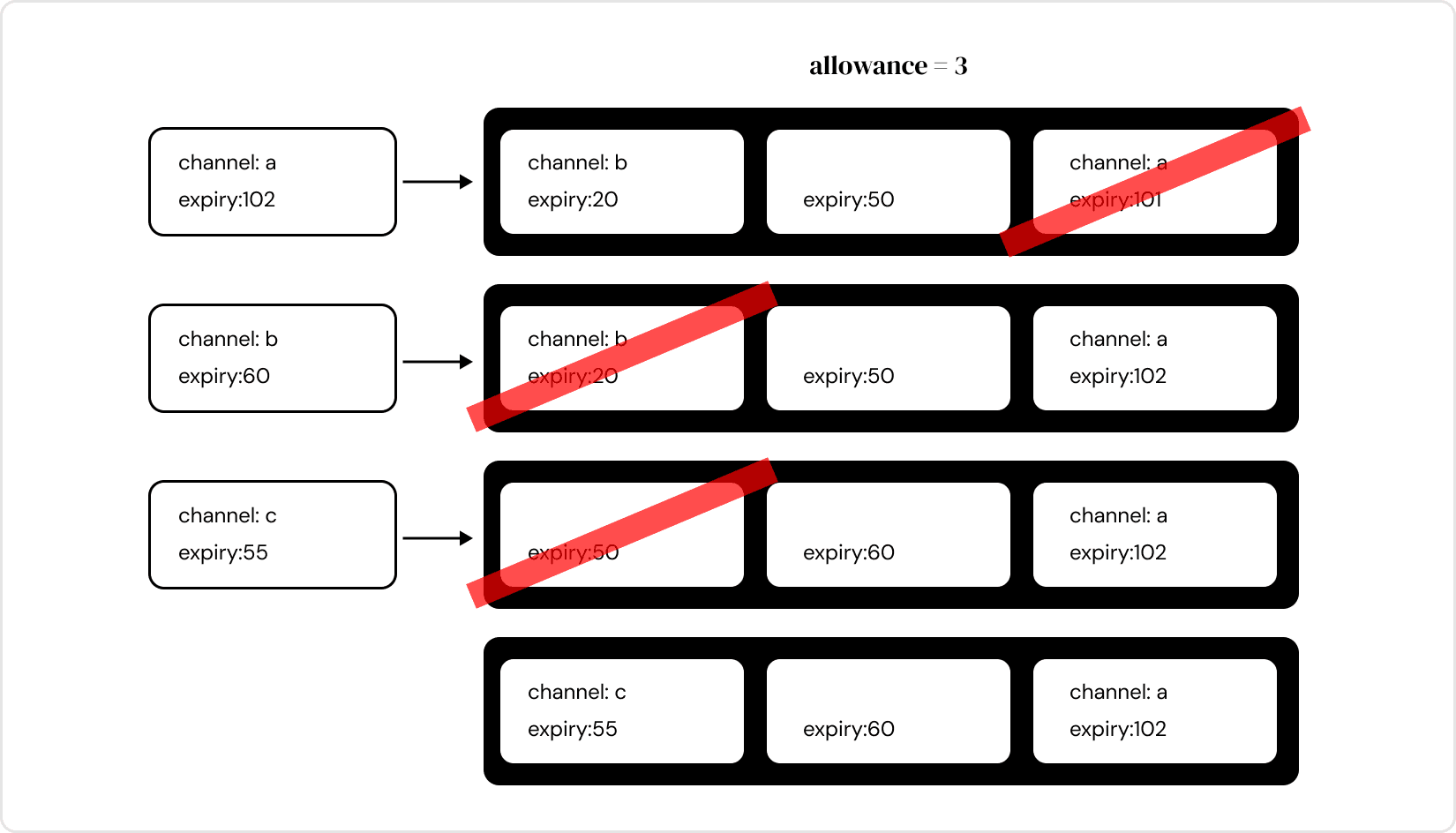 Statements are evicted when an account reaches its allowance.
Statement Store vs Bulletin Chain: when should you use each?
The Statement Store is designed for off-chain signaling: messages, presence, typing indicators, session handshakes, and other relatively small pieces of data that need to propagate quickly between users without being stored on-chain. For larger data, or data where rapid propagation matters less, Bulletin Chain can be a better fit. A chat application, for example, might use statements for messages while storing a photo on Bulletin Chain and sharing a reference to it through the Statement Store.
How can developers use the Statement Store in an app?
So far this has been a general, mostly theoretical tour --- what the Statement Store is, what a statement is, and how its fields shape its life in the store. We haven't shown how to actually use it yet, and that's on purpose.
The practical part comes in the next article. It explains how a node validates a statement and why it might reject one, how statements propagate across the network, and how to query them through subscriptions. It also shows how an app should connect in production without relying on a single RPC node. That is where we move from theory to practice.